Midjourney Web is Live
Skills:
Image Generation Basics90%
Key Takeaways
Midjourney's web interface allows users to create images using text prompts, with features like image generation, editing, and collaboration. The platform provides a clean and intuitive interface for navigating and creating art.
Full Transcript
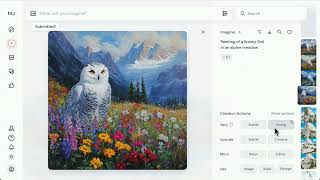
hi everyone welcome to Mid Journey let's get started by creating an image describe what you want to create in the Imagine bar and press enter to submit you'll see your image begin to generate in the create tab each time you generate it will create a set of four Images click on them to view them closer in the light box you can use the arrow keys or the scroll wheel to few others in the set for every image that you create there's a set of actions that you can take to build on it learn more about each of these creation actions by hovering on the text next to the buttons suppose I really like this image but I want to create more versions of it for that I'll use the very strong tool I'll click the button and return to the create tab to view the generation now I have four more images that are inspired by the original you can change your image generation settings at any time by clicking on this icon here I'll change it so that my images generate in a landscape orientation by default to organize or download your images go to the organize tab here you can click and drag to select images and from there either add them to a folder or download if you want to create with others go to the rooms tab here you can see what others are creating send message messages in the chat or create images of your own there's a wide range of rooms available in the lobby for you to explore if you're ever looking for inspiration you can go back to the explore tab here you can view images and you can even use them in your own prompts this is just a small snippet of all the things you can do and explore with mid Journey we hope you have a blast and can't wait to see what you imagine
Original Description
Midjourney is now on the web — making it easier than ever to create breathtaking art.
In this video, you’ll get a guided tour of the new Midjourney web experience:
* Effortlessly navigate a clean, intuitive interface
* Write prompts that transform ideas into visuals
* Watch your imagination unfold in real time
Whether you're a longtime explorer or just beginning your journey, this is your gateway to creating with speed, clarity, and wonder.
Visit https://www.midjourney.com/explore?tab=top to get started.
What will you /imagine today?
#midjourney #imagine #generativeart #aiart #ai
Watch on YouTube ↗
(saves to browser)
Sign in to unlock AI tutor explanation · ⚡30
Playlist
Uploads from Midjourney · Midjourney · 1 of 14
← Previous
Next →
▶
 2
2
 3
3
 4
4
 5
5
 6
6
 7
7
 8
8
 9
9
 10
10
 11
11
 12
12
 13
13
 14
14
Midjourney Web is Live
Midjourney
Introducing Draft Mode for Midjourney V7
Midjourney
Introducing Midjourney V1 Video
Midjourney
Beginner's Guide to Style References (sref)
Midjourney
How to Use Stylize Parameters
Midjourney
Create and Use Moodboards to Make Images
Midjourney
Get Better Images with Personalization
Midjourney
An Underrated Feature: Chaos / Variety
Midjourney
Create Your First Video
Midjourney
How to Organize Your Creations
Midjourney
Start Here: Making your First Image
Midjourney
Discover Different Creation Modes
Midjourney
5 Ways to Use Images in Midjourney
Midjourney
Midjourney TV 24/7
Midjourney
More on: Image Generation Basics
View skill →


![Qwen 2.5 AI: Complete Beginner Tutorial [100% Free and OpenSource]](https://i.ytimg.com/vi/kdSSgMDk_QE/mqdefault.jpg)



Related Reads
📰
📰
📰
📰
50+ Sequential Images, One Prompt in Codex
Medium · ChatGPT
How can I batch-generate 3D assets from prompts or images using an API, and which 3D generation APIs support batch generation?
Reddit r/artificial
How AI Head Swap Works: The Technology Behind Realistic AI Image Replacement
Dev.to AI
How I Built an AI Pet Portrait Generator That Turns Photos Into Art
Dev.to · William Li
🎓
Tutor Explanation

 DeepCamp AI