Suspicious USB Stick(BTLO) writeup
📰 Medium · Cybersecurity
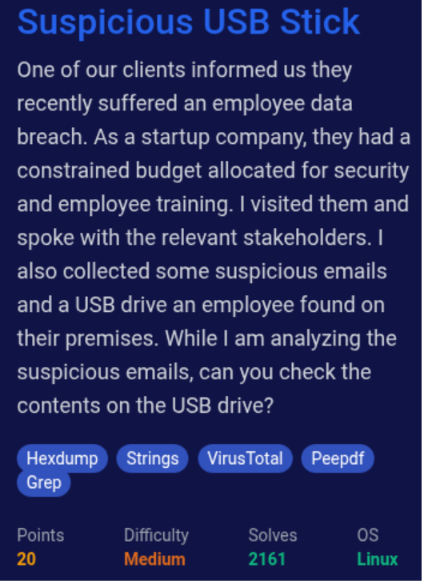
Learn how to analyze a suspicious USB stick using cybersecurity techniques and tools
Action Steps
- Download and unzip the suspicious USB stick file to analyze its contents
- Use command-line tools to list and explore the contents of the unzipped file
- Change directory to the lab's directory and unzip the USB zip file to further analyze its contents
- Use cybersecurity tools and techniques to identify potential threats and malware in the USB stick's contents
- Analyze the results and draw conclusions about the potential risks and threats posed by the suspicious USB stick
Who Needs to Know This
Security analysts and cybersecurity professionals can benefit from this tutorial to improve their skills in analyzing and identifying potential threats from unknown USB devices
Key Insight
💡 Using command-line tools and cybersecurity techniques can help identify potential threats and malware in unknown USB devices
Share This
🚨 Analyze suspicious USB sticks like a pro! 🚨
Key Takeaways
Learn how to analyze a suspicious USB stick using cybersecurity techniques and tools
Full Article
Title: Suspicious USB Stick(BTLO) writeup
URL Source: https://medium.com/@alamuolubusayo/suspicious-usb-stick-btlo-writeup-f99964b65738?source=rss------cybersecurity-5
Published Time: 2026-06-20T21:33:43Z
Markdown Content:
# Suspicious USB Stick(BTLO) writeup - Olubusayo Alamu - Medium
[Sitemap](https://medium.com/sitemap/sitemap.xml)
[Open in app](https://play.google.com/store/apps/details?id=com.medium.reader&referrer=utm_source%3DmobileNavBar&source=post_page---top_nav_layout_nav-----------------------------------------)
Sign up
[Sign in](https://medium.com/m/signin?operation=login&redirect=https%3A%2F%2Fmedium.com%2F%40alamuolubusayo%2Fsuspicious-usb-stick-btlo-writeup-f99964b65738&source=post_page---top_nav_layout_nav-----------------------global_nav------------------)
[](https://medium.com/?source=post_page---top_nav_layout_nav-----------------------------------------)
Get app
[Write](https://medium.com/m/signin?operation=register&redirect=https%3A%2F%2Fmedium.com%2Fnew-story&source=---top_nav_layout_nav-----------------------new_post_topnav------------------)
[Search](https://medium.com/search?source=post_page---top_nav_layout_nav-----------------------------------------)
Sign up
[Sign in](https://medium.com/m/signin?operation=login&redirect=https%3A%2F%2Fmedium.com%2F%40alamuolubusayo%2Fsuspicious-usb-stick-btlo-writeup-f99964b65738&source=post_page---top_nav_layout_nav-----------------------global_nav------------------)

# Suspicious USB Stick(BTLO) writeup
[](https://medium.com/@alamuolubusayo?source=post_page---byline--f99964b65738---------------------------------------)
[Olubusayo Alamu](https://medium.com/@alamuolubusayo?source=post_page---byline--f99964b65738---------------------------------------)
Follow
3 hours ago
[](https://medium.com/m/signin?actionUrl=https%3A%2F%2Fmedium.com%2F_%2Fvote%2Fp%2Ff99964b65738&operation=register&redirect=https%3A%2F%2Fmedium.com%2F%40alamuolubusayo%2Fsuspicious-usb-stick-btlo-writeup-f99964b65738&user=Olubusayo+Alamu&userId=9abe4839088&source=---header_actions--f99964b65738---------------------clap_footer------------------)
[](https://medium.com/m/signin?actionUrl=https%3A%2F%2Fmedium.com%2F_%2Frepost%2Fp%2Ff99964b65738&operation=register&redirect=https%3A%2F%2Fmedium.com%2F%40alamuolubusayo%2Fsuspicious-usb-stick-btlo-writeup-f99964b65738&user=Olubusayo+Alamu&userId=9abe4839088&source=---header_actions--f99964b65738---------------------repost_header------------------)
[](https://medium.com/m/signin?actionUrl=https%3A%2F%2Fmedium.com%2F_%2Fbookmark%2Fp%2Ff99964b65738&operation=register&redirect=https%3A%2F%2Fmedium.com%2F%40alamuolubusayo%2Fsuspicious-usb-stick-btlo-writeup-f99964b65738&source=---header_actions--f99964b65738---------------------bookmark_footer------------------)
[Listen](https://medium.com/m/signin?actionUrl=https%3A%2F%2Fmedium.com%2Fplans%3Fdimension%3Dpost_audio_button%26postId%3Df99964b65738&operation=register&redirect=https%3A%2F%2Fmedium.com%2F%40alamuolubusayo%2Fsuspicious-usb-stick-btlo-writeup-f99964b65738&source=---header_actions--f99964b65738---------------------post_audio_button------------------)
Share
Press enter or click to view image in full size
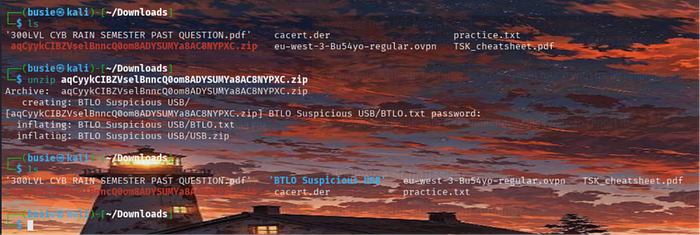
I downloaded the file, unzipped it and listed out the content of the of the unzipped file.
Press enter or click to view image in full size
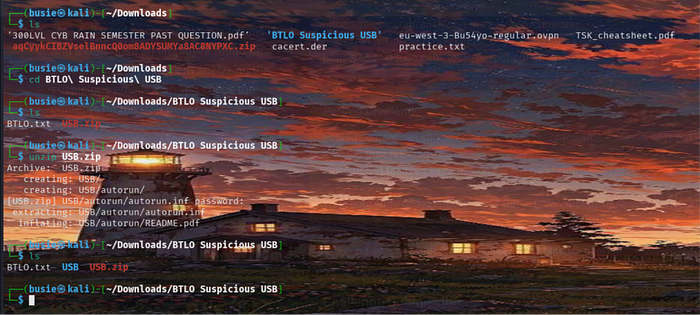
I changed my directory to the lab’s directory and I also unzipped the USB zip file.
**Question 1;**
Press enter or click to view image in full size
 writeup - Olubusayo Alamu - Medium
[Sitemap](https://medium.com/sitemap/sitemap.xml)
[Open in app](https://play.google.com/store/apps/details?id=com.medium.reader&referrer=utm_source%3DmobileNavBar&source=post_page---top_nav_layout_nav-----------------------------------------)
Sign up
[Sign in](https://medium.com/m/signin?operation=login&redirect=https%3A%2F%2Fmedium.com%2F%40alamuolubusayo%2Fsuspicious-usb-stick-btlo-writeup-f99964b65738&source=post_page---top_nav_layout_nav-----------------------global_nav------------------)
[](https://medium.com/?source=post_page---top_nav_layout_nav-----------------------------------------)
Get app
[Write](https://medium.com/m/signin?operation=register&redirect=https%3A%2F%2Fmedium.com%2Fnew-story&source=---top_nav_layout_nav-----------------------new_post_topnav------------------)
[Search](https://medium.com/search?source=post_page---top_nav_layout_nav-----------------------------------------)
Sign up
[Sign in](https://medium.com/m/signin?operation=login&redirect=https%3A%2F%2Fmedium.com%2F%40alamuolubusayo%2Fsuspicious-usb-stick-btlo-writeup-f99964b65738&source=post_page---top_nav_layout_nav-----------------------global_nav------------------)

# Suspicious USB Stick(BTLO) writeup
[](https://medium.com/@alamuolubusayo?source=post_page---byline--f99964b65738---------------------------------------)
[Olubusayo Alamu](https://medium.com/@alamuolubusayo?source=post_page---byline--f99964b65738---------------------------------------)
Follow
3 hours ago
[](https://medium.com/m/signin?actionUrl=https%3A%2F%2Fmedium.com%2F_%2Fvote%2Fp%2Ff99964b65738&operation=register&redirect=https%3A%2F%2Fmedium.com%2F%40alamuolubusayo%2Fsuspicious-usb-stick-btlo-writeup-f99964b65738&user=Olubusayo+Alamu&userId=9abe4839088&source=---header_actions--f99964b65738---------------------clap_footer------------------)
[](https://medium.com/m/signin?actionUrl=https%3A%2F%2Fmedium.com%2F_%2Frepost%2Fp%2Ff99964b65738&operation=register&redirect=https%3A%2F%2Fmedium.com%2F%40alamuolubusayo%2Fsuspicious-usb-stick-btlo-writeup-f99964b65738&user=Olubusayo+Alamu&userId=9abe4839088&source=---header_actions--f99964b65738---------------------repost_header------------------)
[](https://medium.com/m/signin?actionUrl=https%3A%2F%2Fmedium.com%2F_%2Fbookmark%2Fp%2Ff99964b65738&operation=register&redirect=https%3A%2F%2Fmedium.com%2F%40alamuolubusayo%2Fsuspicious-usb-stick-btlo-writeup-f99964b65738&source=---header_actions--f99964b65738---------------------bookmark_footer------------------)
[Listen](https://medium.com/m/signin?actionUrl=https%3A%2F%2Fmedium.com%2Fplans%3Fdimension%3Dpost_audio_button%26postId%3Df99964b65738&operation=register&redirect=https%3A%2F%2Fmedium.com%2F%40alamuolubusayo%2Fsuspicious-usb-stick-btlo-writeup-f99964b65738&source=---header_actions--f99964b65738---------------------post_audio_button------------------)
Share

Press enter or click to view image in full size

I downloaded the file, unzipped it and listed out the content of the of the unzipped file.
Press enter or click to view image in full size

I changed my directory to the lab’s directory and I also unzipped the USB zip file.
**Question 1;**
Press enter or click to view image in full size


 DeepCamp AI