I Stopped Killing My Dev Server. I Park It Instead.
Learn how to use a CLI tool called 'park' to freeze and resume a running process, releasing its TCP port without losing in-memory caches or build watcher state, and why it matters for efficient development workflows
- Install 'park' using the provided one-liner command
- Use 'park' to freeze a running process on a specific port, e.g., 'park 3000'
- Verify that the process has been frozen and the port is released
- Resume the frozen process using 'park resume 3000'
- Test that the resumed process is working as expected, e.g., using 'curl localhost:3000'
Developers and DevOps engineers can benefit from using 'park' to streamline their development processes and reduce downtime, making it easier to test and deploy applications
💡 The 'park' tool allows developers to efficiently manage running processes and release TCP ports without incurring downtime or losing valuable state information
🚀 Streamline your dev workflow with 'park', a CLI tool that freezes & resumes processes without losing cache or state! 🚀
Key Takeaways
Learn how to use a CLI tool called 'park' to freeze and resume a running process, releasing its TCP port without losing in-memory caches or build watcher state, and why it matters for efficient development workflows
Full Article
URL Source: https://mrvaibh.medium.com/i-stopped-killing-my-dev-server-i-park-it-instead-53629bcd64fd?source=rss------programming-5
Published Time: 2026-04-12T19:08:36Z
Markdown Content:
# I Stopped Killing My Dev Server. I Park It Instead. | by Vaibhav Shukla | Apr, 2026 | Medium
[Sitemap](https://mrvaibh.medium.com/sitemap/sitemap.xml)
[Open in app](https://play.google.com/store/apps/details?id=com.medium.reader&referrer=utm_source%3DmobileNavBar&source=post_page---top_nav_layout_nav-----------------------------------------)
Sign up
[Sign in](https://medium.com/m/signin?operation=login&redirect=https%3A%2F%2Fmrvaibh.medium.com%2Fi-stopped-killing-my-dev-server-i-park-it-instead-53629bcd64fd&source=post_page---top_nav_layout_nav-----------------------global_nav------------------)
[](https://medium.com/?source=post_page---top_nav_layout_nav-----------------------------------------)
Get app
[Write](https://medium.com/m/signin?operation=register&redirect=https%3A%2F%2Fmedium.com%2Fnew-story&source=---top_nav_layout_nav-----------------------new_post_topnav------------------)
[Search](https://medium.com/search?source=post_page---top_nav_layout_nav-----------------------------------------)
Sign up
[Sign in](https://medium.com/m/signin?operation=login&redirect=https%3A%2F%2Fmrvaibh.medium.com%2Fi-stopped-killing-my-dev-server-i-park-it-instead-53629bcd64fd&source=post_page---top_nav_layout_nav-----------------------global_nav------------------)

# I Stopped Killing My Dev Server. I Park It Instead.
[](https://mrvaibh.medium.com/?source=post_page---byline--53629bcd64fd---------------------------------------)
[Vaibhav Shukla](https://mrvaibh.medium.com/?source=post_page---byline--53629bcd64fd---------------------------------------)
6 min read
·
Just now
[](https://medium.com/m/signin?actionUrl=https%3A%2F%2Fmedium.com%2F_%2Fvote%2Fp%2F53629bcd64fd&operation=register&redirect=https%3A%2F%2Fmrvaibh.medium.com%2Fi-stopped-killing-my-dev-server-i-park-it-instead-53629bcd64fd&user=Vaibhav+Shukla&userId=3cc4b804b385&source=---header_actions--53629bcd64fd---------------------clap_footer------------------)
--
[](https://medium.com/m/signin?actionUrl=https%3A%2F%2Fmedium.com%2F_%2Fbookmark%2Fp%2F53629bcd64fd&operation=register&redirect=https%3A%2F%2Fmrvaibh.medium.com%2Fi-stopped-killing-my-dev-server-i-park-it-instead-53629bcd64fd&source=---header_actions--53629bcd64fd---------------------bookmark_footer------------------)
[Listen](https://medium.com/m/signin?actionUrl=https%3A%2F%2Fmedium.com%2Fplans%3Fdimension%3Dpost_audio_button%26postId%3D53629bcd64fd&operation=register&redirect=https%3A%2F%2Fmrvaibh.medium.com%2Fi-stopped-killing-my-dev-server-i-park-it-instead-53629bcd64fd&source=---header_actions--53629bcd64fd---------------------post_audio_button------------------)
Share
Press enter or click to view image in full size
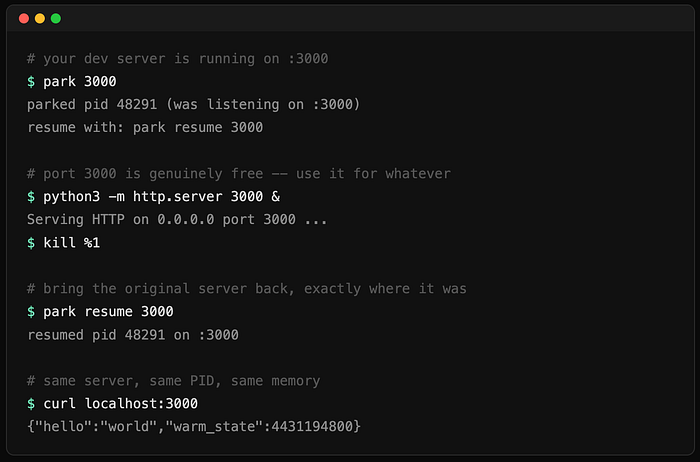
Every developer has done this: you’re running a dev server on port 3000. You need that port for 30 seconds to test something else. So you kill the server, lose your in-memory caches, build watcher state,
websocket clients, and warm-up time. Then you restart everything from scratch.
I did this five times a day until I decided to fix it.
I built park — a CLI tool that freezes a running process AND releases its TCP port, then brings it back later. Same PID. Same memory. Same open files. The process has no idea anything happened.
$ park 3000
$ python3 -m http.server 3000 &
$ kill %1
$ park resume 3000
$ curl localhost:3000
Watch the demo: [https://asciinema.org/a/920996](https://asciinema.org/a/920996)
Install in one line:
curl -fsSL https://raw.githubusercontent






 DeepCamp AI