DOOMQL
📰 Simon Willison's Blog
Learn how to build a Doom-like game using SQLite and Python, and explore the game's state using Datasette and custom HTML+JavaScript apps
Action Steps
- Clone the DOOMQL repository using Git and run the game using Python
- Explore the game's SQLite database using Datasette and the Datasette Apps plugin
- Build a custom HTML+JavaScript app to display the game's state using the frame_pixels view
- Add a minimap to the app to enhance the game's visualization
- Use the app to reflect the current state of the game while playing in the terminal
Who Needs to Know This
Developers and data scientists can benefit from this project, as it showcases the potential of using SQL databases as game engines and demonstrates the use of Datasette for data exploration and visualization
Key Insight
💡 SQLite can be used as a game engine, and Datasette can be used to explore and visualize the game's state in real-time
Share This
🚀 Build a Doom-like game using SQLite and Python! 🎮 Explore the game's state with Datasette and custom HTML+JavaScript apps 📊
Key Takeaways
Learn how to build a Doom-like game using SQLite and Python, and explore the game's state using Datasette and custom HTML+JavaScript apps
Full Article
Title: DOOMQL
URL Source: https://simonwillison.net/2026/Jul/13/doomql/
Published Time: Mon, 13 Jul 2026 22:35:57 GMT
Markdown Content:
# [Simon Willison’s Weblog](https://simonwillison.net/)
[Subscribe](https://simonwillison.net/about/#subscribe)
**Sponsored by:**[Teleport](https://fandf.co/4b48aSh) — How do you ensure that AI agents act within your intended boundaries? Teleport’s “From Zero Trust to Agent Trust” white paper details what needs to be in place to realize the promise of agentic designs.
13th July 2026 - Link Blog
**[DOOMQL](https://github.com/petergpt/doomql)** ([via](https://twitter.com/petergostev/status/2076692164310884468 "@petergostev")) Peter Gostev built this using GPT-5.6 Sol. This is a _lot_ of fun:
> DOOMQL started with a deliberately unreasonable question: what if SQLite were the game engine, not merely the place where a game stores data?
>
>
> The result is a small, original Doom-like game in which SQL owns movement, collision, enemies, combat, progression and every RGB pixel on screen.
It's implemented as a Python terminal script - I tried it out like this:
```
cd /tmp
git clone https://github.com/petergpt/doomql
cd doomql
uv run host/doomql.py
```
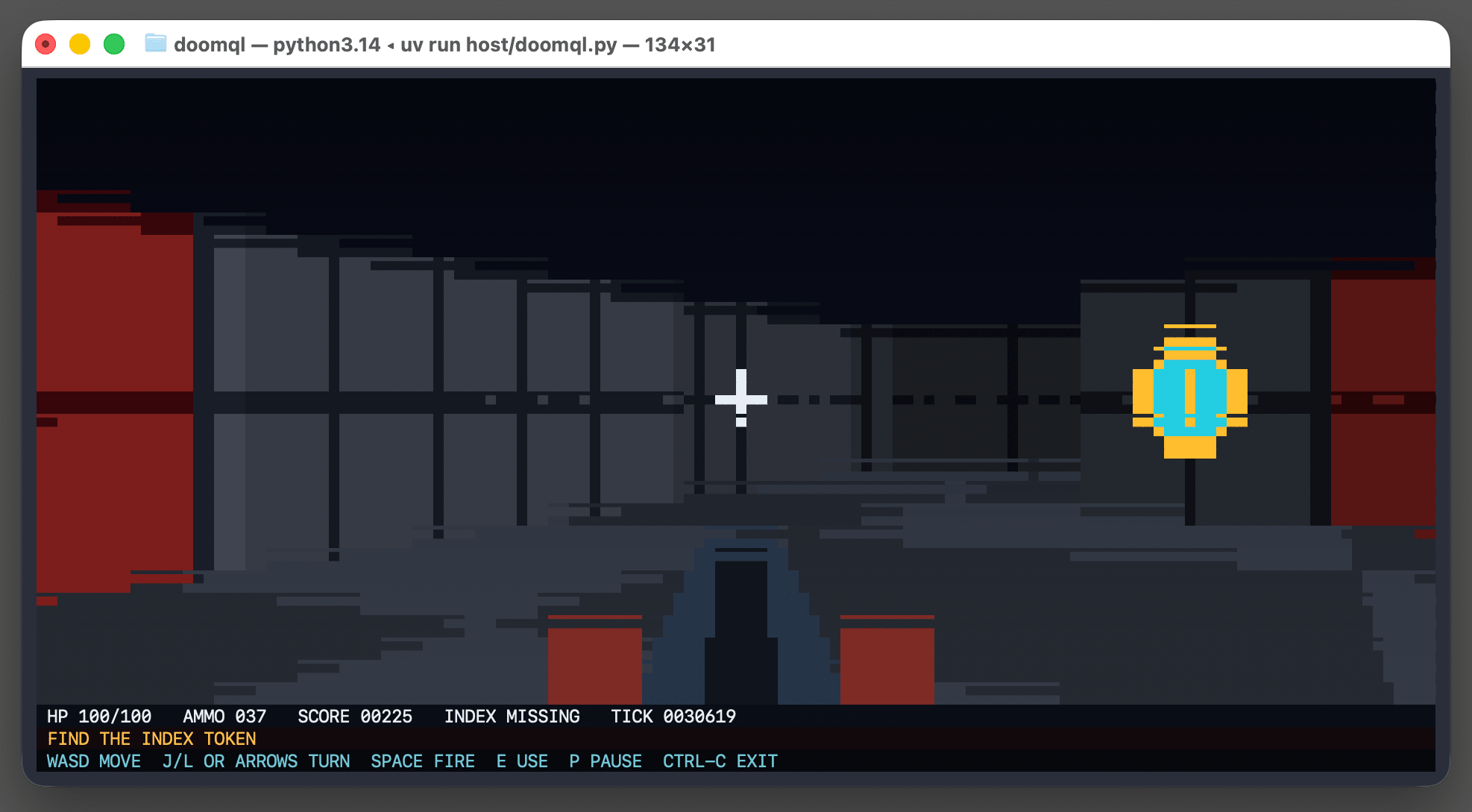
Here's [the huge SQL query](https://github.com/petergpt/doomql/blob/main/sql/003_render.sql) that implements a full ray tracer in SQLite using a recursive CTE.
Running the above script creates a `/tmp/doomql/.doomql/doomql.sqlite` SQLite database, which you can explore using Datasette like this:
```
uvx --prerelease=allow --with datasette-apps datasette \
/tmp/doomql/.doomql/doomql.sqlite \
-p 4444 --root --secret 1 --internal internal.db
```
The `--with datasette-apps` option installs the new [Datasette Apps](https://simonwillison.net/2026/Jun/18/datasette-apps/) plugin, which supports creating custom HTML+JavaScript apps that can run SQL queries directly within the Datasette interface.
I created a new app, pasted the copy-paste prompt into Claude chat (Fable 5) [and told it](https://claude.ai/share/c793280c-2ef1-4555-a7c2-31281abfdf78):
> `Build an app that displays the current state of the screen using the frame_pixels view with its x, y, r, g, b columns. have it refresh once a second.`
This got me a working HTML+JavaScript app inside Datasette that could reflect the current state while I played the game in my terminal. Then I added:
> `add a minimap`
And now my Datasette App looks like this:

[Subscribe](https://simonwillison.net/about/#subscribe)
**Sponsored by:**[Teleport](https://fandf.co/4b48aSh) — How do you ensure that AI agents act within your intended boundaries? Teleport’s “From Zero Trust to Agent Trust” white paper details what needs to be in place to realize the promise of agentic designs.
13th July 2026 - Link Blog
**[DOOMQL](https://github.com/petergpt/doomql)** ([via](https://twitter.com/petergostev/status/2076692164310884468 "@petergostev")) Peter Gostev built this using GPT-5.6 Sol. This is a _lot_ of fun:
> DOOMQL started with a deliberately unreasonable question: what if SQLite were the game engine, not merely the place where a game stores data?
>
>
> The result is a small, original Doom-like game in which SQL owns movement, collision, enemies, combat, progression and every RGB pixel on screen.
It's implemented as a Python terminal script - I tried it out like this:
```
cd /tmp
git clone https://github.com/petergpt/doomql
cd doomql
uv run host/doomql.py
```

Here's [the huge SQL query](https://github.com/petergpt/doomql/blob/main/sql/003_render.sql) that implements a full ray tracer in SQLite using a recursive CTE.
Running the above script creates a `/tmp/doomql/.doomql/doomql.sqlite` SQLite database, which you can explore using Datasette like this:
```
uvx --prerelease=allow --with datasette-apps datasette \
/tmp/doomql/.doomql/doomql.sqlite \
-p 4444 --root --secret 1 --internal internal.db
```
The `--with datasette-apps` option installs the new [Datasette Apps](https://simonwillison.net/2026/Jun/18/datasette-apps/) plugin, which supports creating custom HTML+JavaScript apps that can run SQL queries directly within the Datasette interface.
I created a new app, pasted the copy-paste prompt into Claude chat (Fable 5) [and told it](https://claude.ai/share/c793280c-2ef1-4555-a7c2-31281abfdf78):
> `Build an app that displays the current state of the screen using the frame_pixels view with its x, y, r, g, b columns. have it refresh once a second.`
This got me a working HTML+JavaScript app inside Datasette that could reflect the current state while I played the game in my terminal. Then I added:
> `add a minimap`
And now my Datasette App looks like this:

 DeepCamp AI